
AI Video Summarizer vs YouTube Transcript AI: Streamlined Content Workflow
For users who only need to transcribe videos, both AI Video Summarizer and YouTube Transcript AI seem to offer what they need. However, what happens after the transcript is generated is where the two tools start to differ.
This article compares AI Video Summarizer and YouTube Transcript AI across video processing, transcript output, content reuse, and download options to help you find the tool that better matches your workflow.
AI Video Summarizer vs YouTube Transcript AI Quick Comparison
| Aspect | AI Video Summarizer | YouTube Transcript AI |
|---|---|---|
| Main Focus | Video summarization & content reuse | YouTube transcription |
| Login | ✅ No sign-up required | ✅ No sign-up required |
| Price | ✅ 100% free | ✅ Free |
| Input Sources | Videos, audio, PDFs, images, and links | YouTube videos |
| AI Processing | Built-in AI tools | AI prompts |
| Transcript Format | Paragraph-based with timestamps | Subtitle-style with timestamps |
| Content Reuse | ✅ Multiple formats & templates | ⚠️ External AI tools |
| Export | TXT, Word, PDF, SRT | TXT, Markdown |
| Best For | Understanding and reusing video content | Quick YouTube transcript access |
What Is AI Video Summarizer?
AI Video Summarizer is an online tool that combines video transcript generator, content summarization, and information organization in one place. Unlike tools that mainly focus on extracting video transcripts, AI Video Summarizer puts more emphasis on what happens after transcription.
Once the transcription is complete, users can access not only a full transcript with timestamps, but also overviews, subtitles, summaries, translations, AI Chat for follow-up questions, mind maps, and more. It provides a complete workflow for users to process and understand video content more efficiently.
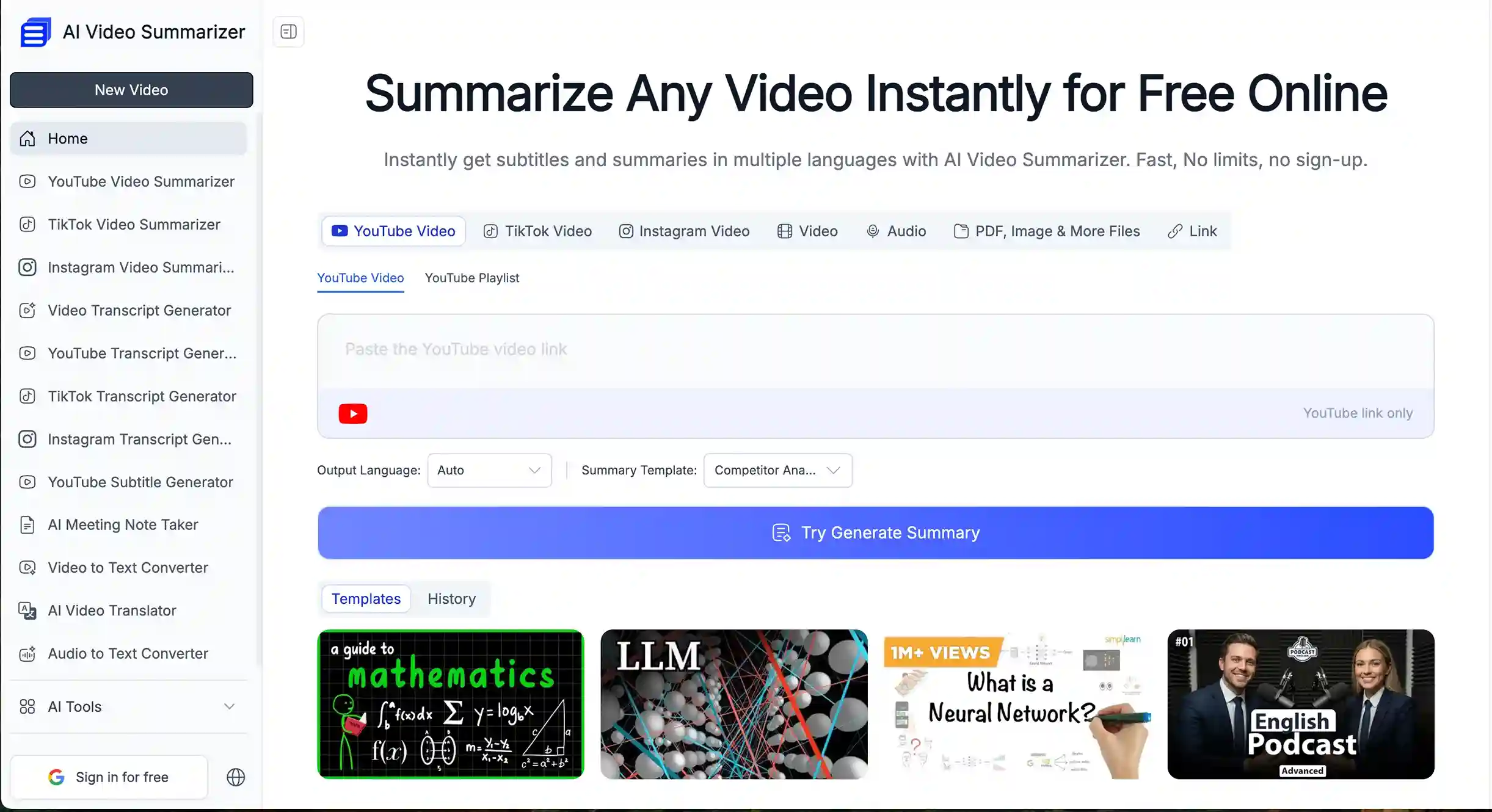
Key Features
- Available online and as a Chrome extension: Access the tool directly from the browser or use the extension for a more convenient workflow.
- Supports multiple content formats: Transcribe and summarize videos, audio files, documents, PDFs, and images in one place.
- Multilingual transcription and translation: Process content in multiple languages and translate exported results into different languages when needed.
- Speaker identification: Detect different speakers in transcripts, making conversations and interviews easier to follow.
- AI Chat for follow-up questions: Ask questions about the content and quickly find details or clarify information from the transcript.
- Flexible export options with timestamps: Export transcripts and generated content in multiple formats while keeping timestamps for easier reference.
What Is YouTube Transcript AI?
YouTube Transcript AI is mainly used to extract transcripts from YouTube videos and offers several ways to further process the text, including translation, summarization, chapter generation, and turning content into social media posts.
It is also free to use, making it a convenient option for lightweight users who simply need to get a transcript quickly and work with the content afterward.
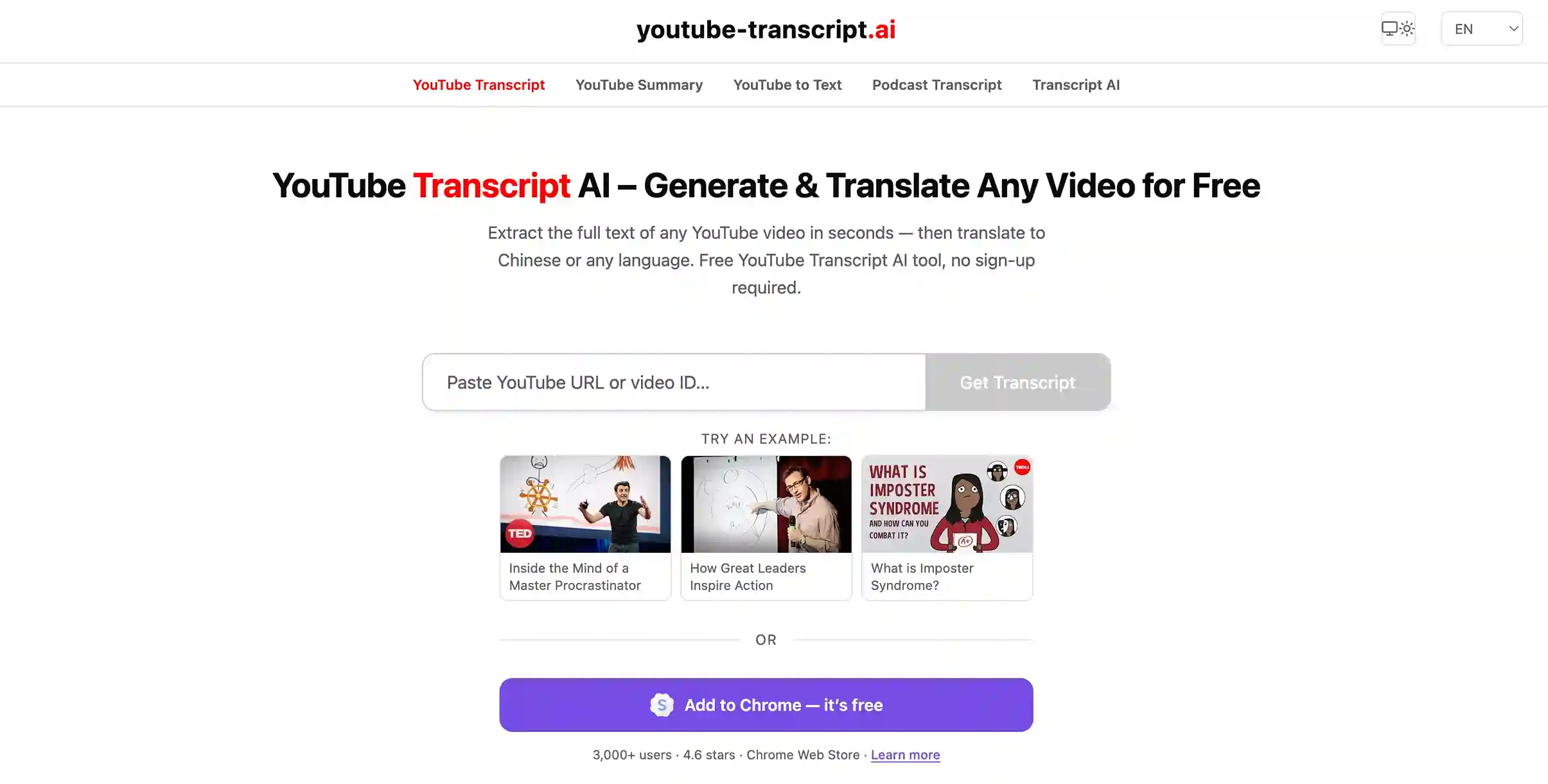
Key Features
- Free to use with no login required: Start transcribing YouTube videos directly without creating an account.
- Focused on YouTube transcription and summaries: Extract transcripts from YouTube videos and get summaries based on the video content.
- Detailed timestamp markers: Keep precise timestamps in the transcript, making it easier to find specific moments in the video.
- AI prompts for content processing: Get ready-to-use prompts for tasks like translation, summarization, chapter creation, and creating posts for X.
- Email delivery for transcripts and summaries: Receive clear subtitles, video summaries, and translated content directly in your inbox.
Core Differences Between AI Video Summarizer and YouTube Transcript AI
AI Video Summarizer vs YouTube Transcript AI: Video Processing Experience
| Aspect | AI Video Summarizer | YouTube Transcript AI |
|---|---|---|
| Login | ✅ No sign-up required | ✅ No sign-up required |
| Workflow | Transcript → AI tools | Transcript → External AI tools |
| Content Processing | ✅ Built-in features | ⚠️ Requires other AI tools |
| Page Switching | ✅ All in one place | ⚠️ Switch between platforms |
AI Video Summarizer: An All-in-One Workflow from Transcription to Content Processing
AI Video Summarizer requires no login, and users can access all core features directly. More than just video transcription, it allows users to summarize content, view subtitles, use AI Chat, and explore other tools on the same page.
The typical workflow is:
- Upload a video or paste a link to start processing
- Get a timestamped transcript after processing
- Export results or continue editing with other AI features
YouTube Transcript AI: Transcript-Focused Workflow with External AI Tools
YouTube Transcript AI mainly focuses on extracting text from YouTube videos. After the transcript is generated, users who want to create summaries, rewrite content, or generate other formats need to use external AI tools such as ChatGPT or Gemini for further processing.
The typical workflow is:
- Paste a YouTube video link to start transcription
- Get the video transcript with timestamps
- Copy the transcript or AI prompts
- Continue processing the content in ChatGPT, Gemini, or other AI tools
Takeaway:
AI Video Summarizer combines transcription and AI-powered content processing in one workflow, allowing users to generate summaries, translations, and organize content without leaving the platform.
YouTube Transcript AI focuses more on quickly extracting video transcripts and relies on external AI tools like ChatGPT and Gemini for further processing, making it a better fit for users who already have a preferred AI workflow.
AI Video Summarizer vs YouTube Transcript AI: Content Output
| AI Video Summarizer | YouTube Transcript AI |
|---|---|
 |
 |
AI Video Summarizer: A Paragraph-Based Transcript Display
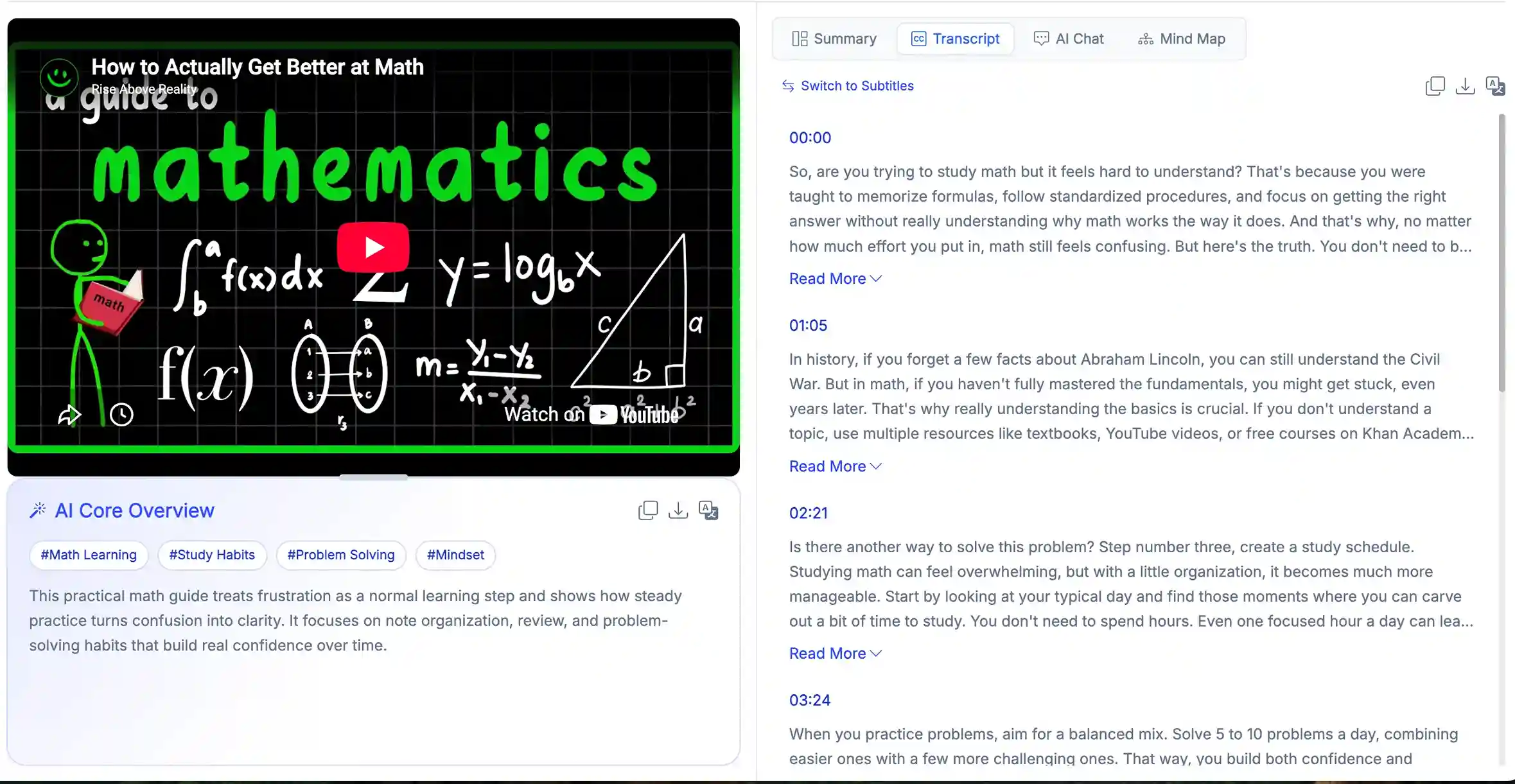
AI Video Summarizer displays transcripts in a format that is more suitable for reading and organizing. The content is presented in complete paragraphs, with timestamps added to each section. This makes it easier to go through longer videos directly.
Besides the transcript, users can also view generated subtitles and summaries on the same page without switching between different pages.
Advantages:
- Easier to read long videos with a clean paragraph-based transcript layout
- View transcripts, subtitles, and summaries in one place
- Quickly find and review important parts of a video
YouTube Transcript AI: A Subtitle-Like Transcript Display
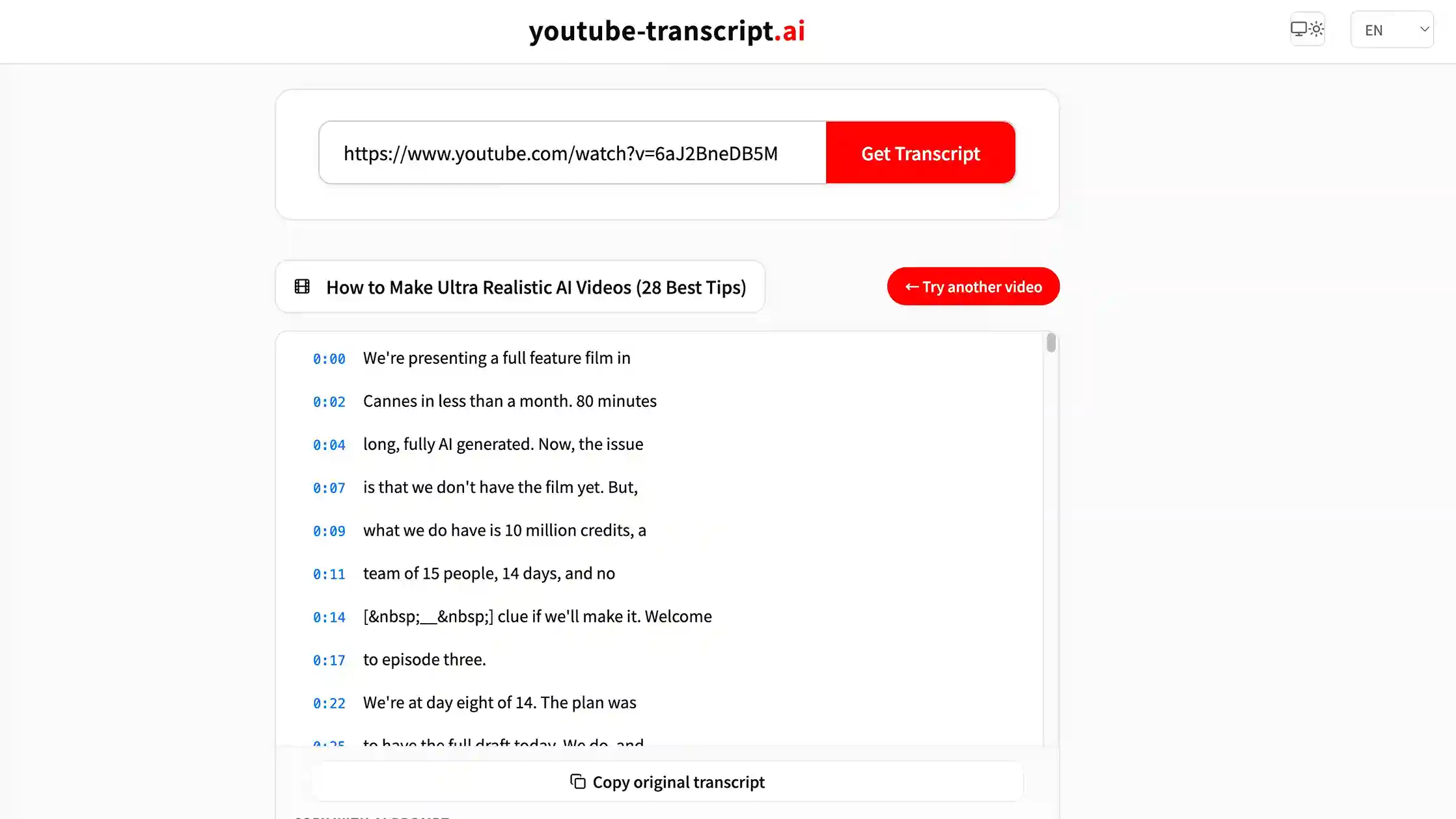
YouTube Transcript AI displays transcripts in a format similar to traditional video subtitles. The content is split into individual lines, with each sentence matched with its corresponding timestamp. This format makes it easier to locate specific parts of the video when needed.
Advantages:
- Familiar subtitle-style layout that is easy to follow
- Quickly find specific sentences or sections in a video
- Simple format for fast transcript viewing
Takeaway:
AI Video Summarizer is better suited for users who want to read and organize video content in one place. Its paragraph-based transcript layout makes longer videos easier to review.
YouTube Transcript AI keeps a subtitle-style format, making it more convenient to quickly find specific moments or sections in a video.
AI Video Summarizer vs YouTube Transcript AI: Storage and Export
| Aspect | AI Video Summarizer | YouTube Transcript AI |
|---|---|---|
| Storage method | Temporary storage for 48 hours | No history storage |
| Download method | ✅Direct download | ⚠️Copy or receive via email |
| Exported content | ✅Transcript, summaries, subtitles | ⚠️Transcript only |
| Export formats | ✅TXT, Word, PDF, SRT | ⚠️TXT, Markdown |
| Timestamp support | ✅Supported in results and exports | ⚠️Supported in results only |
AI Video Summarizer: Flexible Export Options with Temporary Storage
After transcription or other processing, users can directly download the content they need from AI Video Summarizer. It supports common export formats including TXT, Word, PDF, and SRT. Users can choose whether to include timestamps based on their needs. In addition, AI Video Summarizer temporarily stores processed content for 48 hours, allowing users to access and download their results within this period.
YouTube Transcript AI: Simple Transcript Export Without Storage
Unlike AI Video Summarizer, YouTube Transcript AI does not store users' history. After processing is complete, users can either copy the generated transcript directly or enter their email address to receive subtitles and summary content.
Its export options mainly focus on transcripts, supporting TXT and Markdown formats.
Takeaway:
The two tools take different approaches to content storage and export. AI Video Summarizer temporarily keeps processed records and provides more export options with greater flexibility.
YouTube Transcript AI focuses more on quickly getting transcripts and is suitable for users who only need simple transcript access and usage.
Video Summarizer vs YouTube Transcript AI: Video Content Reuse
| Aspect | AI Video Summarizer | YouTube Transcript AI |
|---|---|---|
| AI Chat | ✅ | ❌ |
| Mind Map | ✅ | ❌ |
| Summary Templates | ✅ 30+ templates available | ⚠️ Basic AI prompts available |
| Custom Templates | ✅ | ❌ |
| Content Repurposing | ✅ Supports multiple content formats | ⚠️ Requires external AI tools |
AI Video Summarizer: Turning Videos into Different Types of Content
AI Video Summarizer goes beyond transcripts by offering AI Chat, Mind Map, and 30+ summary templates. Users can choose different templates based on the video type and the result they need.
For example:
Viral Clip Ideas
Finds short-form clip ideas, engaging hooks, and key moments that are worth sharing.
Video to Blog
Turns video content into a structured blog post with a natural article flow.
Meeting Minutes Summary
Transforms meeting content into structured minutes with key points.
Users can also create custom templates based on their needs, such as turning videos into articles, social media posts, or personal notes.
YouTube Transcript AI: Processing Content Through Prompts
YouTube Transcript AI focuses more on transcript-based processing. It provides several AI prompts that users can apply to the transcript, including:
Translate
Translate the transcript into another language.
Summarize
Generate a summary based on the video content.
Post on X
Create posts for X based on the transcript.
For other formats, such as blog posts, study notes, or content ideas, users need to copy the transcript or prompts and continue processing them with tools like ChatGPT.
Takeaway:
AI Video Summarizer is better suited for users who want to turn video content into more organized and reusable formats, such as study materials, articles, or social media content.
YouTube Transcript AI offers a simpler transcript-based approach, making it a good choice for users who prefer adjusting the output themselves and already have a preferred AI workflow.
AI Video Summarizer vs YouTube Transcript AI: Best Use Cases
When to Choose AI Video Summarizer?
If you want to get more value from video content instead of just reading the transcript, AI Video Summarizer is a better fit.
It works well for users who:
- Process different types of content, including videos, audio files, PDFs, and images
- Want to turn videos into different content formats, such as notes, articles or social media posts
- Need AI tools like AI Chat and Mind Map to better understand and organize video information
- Prefer handling transcription, content generation, and reuse in one place
For users who regularly work with different types of video content, AI Video Summarizer helps reduce the time spent on manual organization and additional processing.
When to Choose YouTube Transcript AI?
If your main goal is to quickly get YouTube transcripts and you already prefer using other AI tools for further processing, YouTube Transcript AI may be a better choice.
It works well for users who:
- Only need to view or copy YouTube video transcripts
- Want quick access to video subtitles and timestamps
- Already use tools like ChatGPT to process content
For users who already have their own AI workflow, YouTube Transcript AI provides a simpler way to get transcript content.
Conclusion
For most users who want to get more value from videos, transcription is only the first step. The more important part is how to better understand and make use of the information afterward.
AI Video Summarizer not only helps users extract video transcripts, but also provides a more complete way to organize and work with video content based on different needs.
Compared with tools that mainly focus on transcription, AI Video Summarizer can reduce the extra steps involved in organizing information, creating content, and reusing video materials, making the overall process smoother.
Of course, if you only need to quickly get YouTube subtitles or transcripts, YouTube Transcript AI can handle those basic needs. But for users who want to get more value from video content, AI Video Summarizer is a more suitable choice.