
AI Video Summarizer vs Notta: Wider Summary Coverage
For most users, the goal isn't to find the most feature-packed summarization tool. What they really need is a tool that works right out of the box and fits their specific needs.
AI Video Summarizer and Notta are both worth considering. They help users extract key information from lengthy videos and improve efficiency when working or learning. However, the two tools are designed for different purposes. AI Video Summarizer focuses on summarizing, understanding, and reusing different types of video content, while Notta is more focused on note-taking, meetings, and team collaboration.
This guide compares AI Video Summarizer and Notta across onboarding experience, supported input sources, summary coverage, pricing, and other key aspects to help you choose the tool that best fits your needs.
AI Video Summarizer vs Notta: Quick Comparison Table
| Aspect | AI Video Summarizer | Notta |
|---|---|---|
| Positioning | Content summarization & repurposing | Meeting notes & collaboration |
| Login Barrier | ✅No sign-up required | ⚠️Requires sign-up |
| Pricing | ✅100% free | ⚠️Subscription-based |
| Input Types | Video / audio / PDF / images / links | Meetings / audio / video |
| Main Use Cases | Study / content creation / content organization | Meeting notes / team workflows |
| Handling long content | ✅Up to 1GB per file | ⚠️Limited by plan minutes |
| Storage | 48-hour retention | Cloud storage |
| Export | ✅Free export | ⚠️Paid export features |
| Third-party Integrations | ⚠️Limited | ✅Integrates with Google Meet and 30+ platforms |
| Target Users | Individuals, students, content creators | Teams, businesses, professionals |
What Is AI Video Summarizer?
AI Video Summarizer is a tool designed to help users quickly understand the core information in long videos, articles, or audio content. It covers a wide range of use cases such as tutorial videos, lectures, interviews, and more. Users can directly use the summarized content without needing to watch the full video or go through the entire material.
Compared with more general summarization tools, AI Video Summarizer is not limited to a single fixed structure or rigid formats. It supports a wide range of content types and places more emphasis on understanding and utilizing the information.
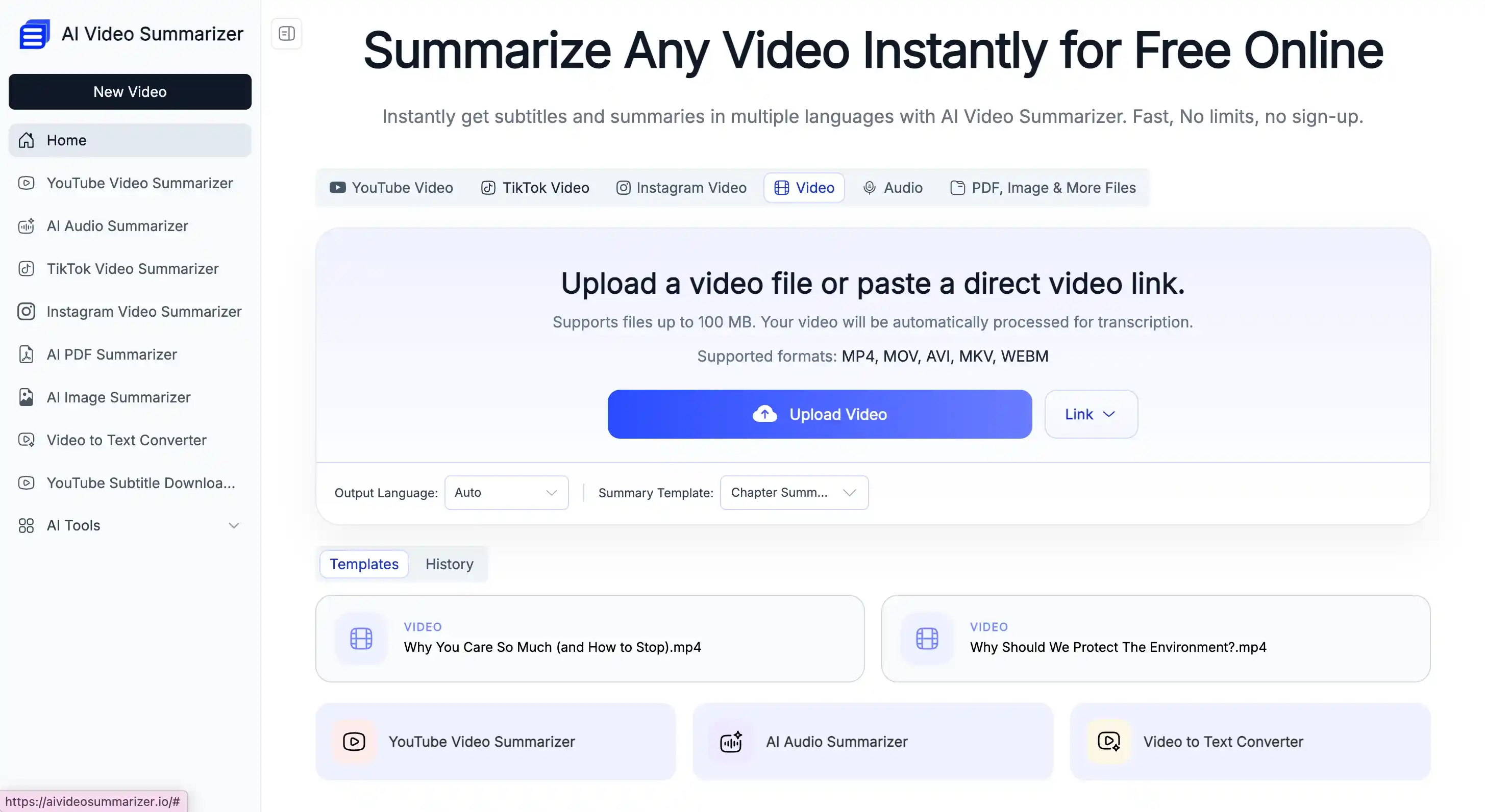
Core Highlights:
- Completely free, with no need to pay to unlock all features
- No registration required, making it faster to start and easier to use
- Supports 156+ languages, offering broad multilingual coverage
- Generates structured summaries, suitable for learning, job hunting, meetings, and more
- High accuracy, producing clear and accurate text with no manual editing needed
What Is Notta?
Notta is a meeting note-taking tool that can convert video, audio, and even recorded content into text transcripts, summaries, and notes.
Its workflow can be integrated with platforms such as Google Meet or Zoom, making it widely used for meetings, interviews, and live streams. For users who need frequent note-taking and team collaboration, it is worth trying.
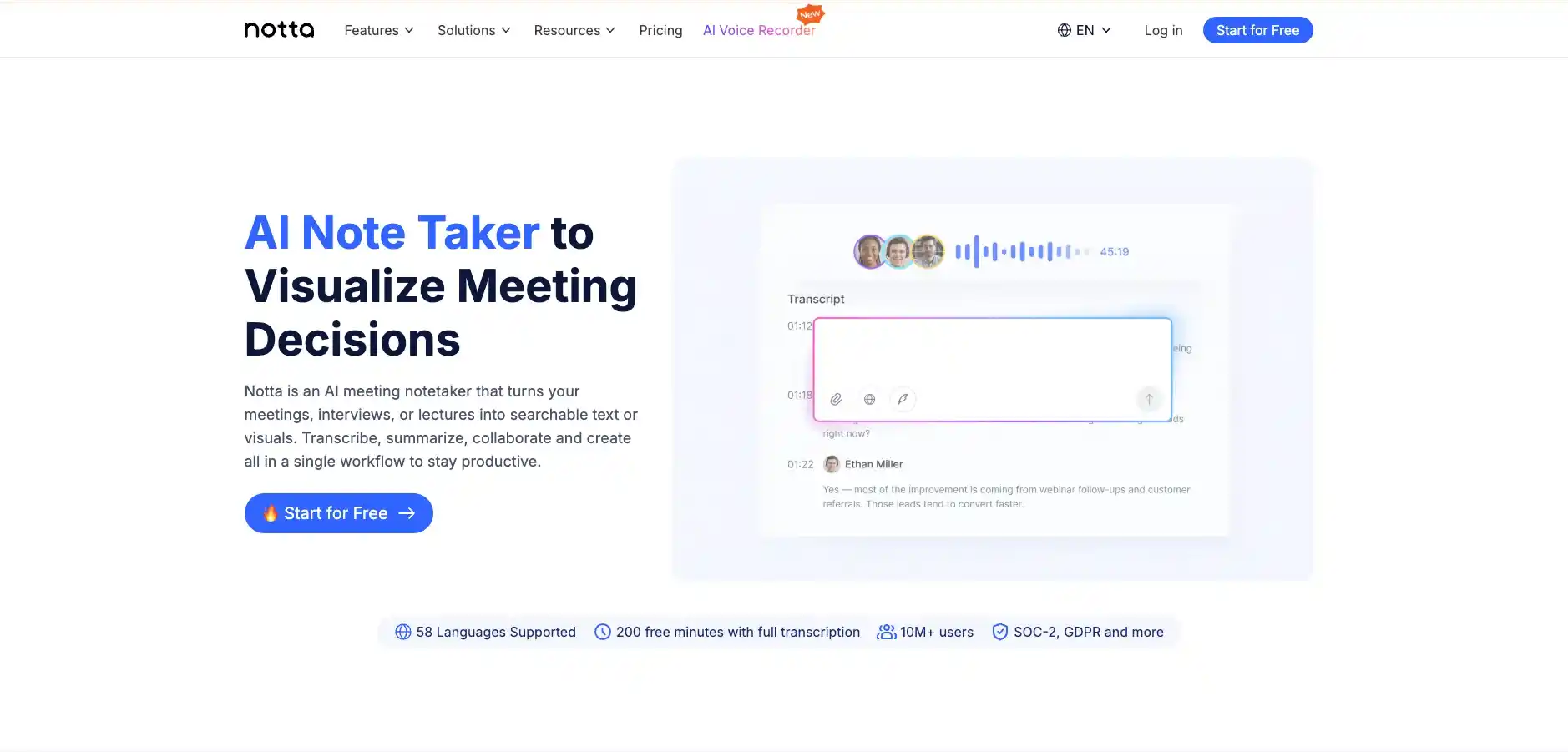
Core Highlights:
- Real-time transcription, supporting audio, meeting, and screen recordings, enabling instant capture of spoken content
- Wide third-party integrations, with 20+ connected tools for a more seamless workflow
- Team collaboration support, allowing users to easily share, access, and manage notes
- Speaker identification with timestamps, helping structure conversations and quickly review key moments
Core Differences Between AI Video Summarizer and Notta
AI Video Summarizer vs Notta: Setup Experience
| Aspect | AI Video Summarizer | Notta |
|---|---|---|
| Login Barrier | ✅No login required | ⚠️Requires signup and login |
| Setup | ✅No setup required | ⚠️Requires account and workspace setup |
| Input Methods | Paste link or upload file | Create/join meeting, upload file, or paste link |
| Time to Result | Fast output in 3-5s | Real-time or post-recording processing |
| Interface | Simple and easy to understand | Some learning curve required |
AI Video Summarizer: A Lightweight, Fast-Start Experience
AI Video Summarizer streamlines the entire workflow as much as possible. Users do not need to register or enter a verification code, and can start using the tool immediately after opening the page. The platform has almost no barriers to entry, and for first-time or beginner users, there is virtually no learning curve, making it easy to get started right away.
The typical workflow is as follows:
- Open the website
- Upload a file or paste a link
- Download or share the transcription or summary
Overall, the experience focuses on fast input and fast output, making it ideal for quick, temporary use or fast access to information.
Notta: A Structured Setup Process Designed for Long-term Use
Notta typically requires users to create an account and set up a personal or team workspace before getting started. Within the platform, users can manage their transcriptions and summarized content.
This structured setup is better suited for long-term use and team collaboration, but for users who only need a quick transcription task, it adds some extra upfront setup steps.
The typical workflow is as follows:
- Open the website and click start
- Register an account and log in
- Start recording or sync with a meeting tool
- Generate and review summary notes
Takeaway:
The key difference in user experience between AI Video Summarizer and Notta lies in onboarding speed and workflow structure. AI Video Summarizer is lightweight and designed for instant use, with a shorter and more direct workflow. Notta, in contrast, is more structured and built for long-term use, making it better suited for team collaboration and ongoing content management.
AI Video Summarizer vs Notta: Input Sources
| Aspect | AI Video Summarizer | Notta |
|---|---|---|
| Link Support | ✅ YouTube & multiple platforms | ⚠️Limited video links |
| Video Input | ✅ Upload video files | ✅ Meeting & video recordings |
| Audio Input | ✅ Upload audio files | ✅ Audio recording & import |
| Extra Inputs | ✅ Images & PDFs supported | ⚠️Mainly audio & meetings |
| Use Focus | ✅ Multi-format content | ⚠️Meeting-focused only |
AI Video Summarizer: Broader Multi-format Input Support
AI Video Summarizer focuses on unified processing of multiple content types. It supports not only videos, but also audio, images, PDFs, and links from various platforms, allowing users to summarize and extract information across different formats in one place.
Its key strengths include:
- Supports multiple input formats, enabling unified summarization across different types of content
- Strong compatibility, making it suitable for a wide range of use cases
Notta: Input System Focused on Meetings And Voice Scenarios
Notta's input methods are designed around meeting and voice use cases, with strong support for meeting recordings, audio input, and some video sources, as well as synchronization with meeting tools.
Its key strengths include:
- Strong support for meeting recordings and real-time voice scenarios
- Integration with meeting tools for automated recording
- Well suited for team meetings, interviews, and ongoing communication content
Takeaway:
Overall, AI Video Summarizer provides more comprehensive input options and is better suited for processing multiple content types, while Notta focuses more on meeting and voice inputs, making it a better fit for structured communication and team collaboration.
AI Video Summarizer vs Notta: Summary Template Variety
AI Video Summarizer is built around content reuse
AI Video Summarizer is built around content reuse. It provides a range of summary templates designed for different output formats, allowing users to turn videos or audio into ready-to-use content rather than just notes or simple summaries.
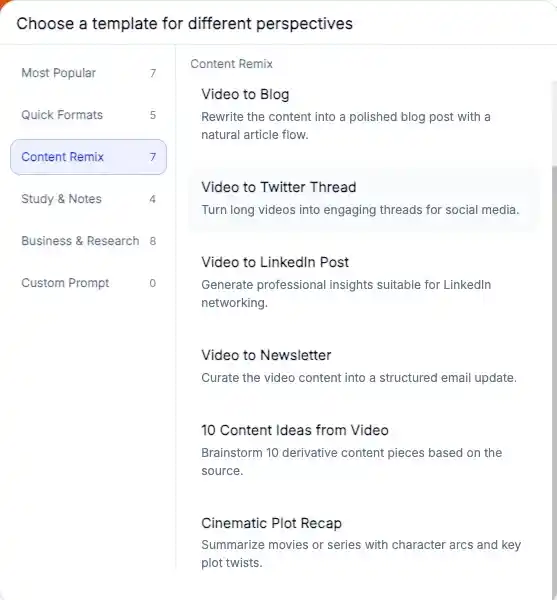
Common templates include:
- Video to Blog: Turns video content into blog-style articles
- Smart Notes: Generates structured, easy-to-review study notes
- Meeting Minutes Summary: Meeting-style summaries for general use cases
- Study Guide: A learning-focused format for organizing and reviewing key points
- Video to Twitter Thread: Breaks content into social media threads
Key highlights:
- More focused on content repurposing rather than basic note-taking
- Templates are designed around how content is used, such as blogs, social media, and study materials
- Turns videos directly into publishable or reusable content
- Focuses on the full workflow from understanding content to producing output
Notta: Industry-based Summary Template System
Notta's template system is more industry-driven, focusing on summary structures designed for different professional and business scenarios, with an emphasis on meeting notes and standardized workflows.
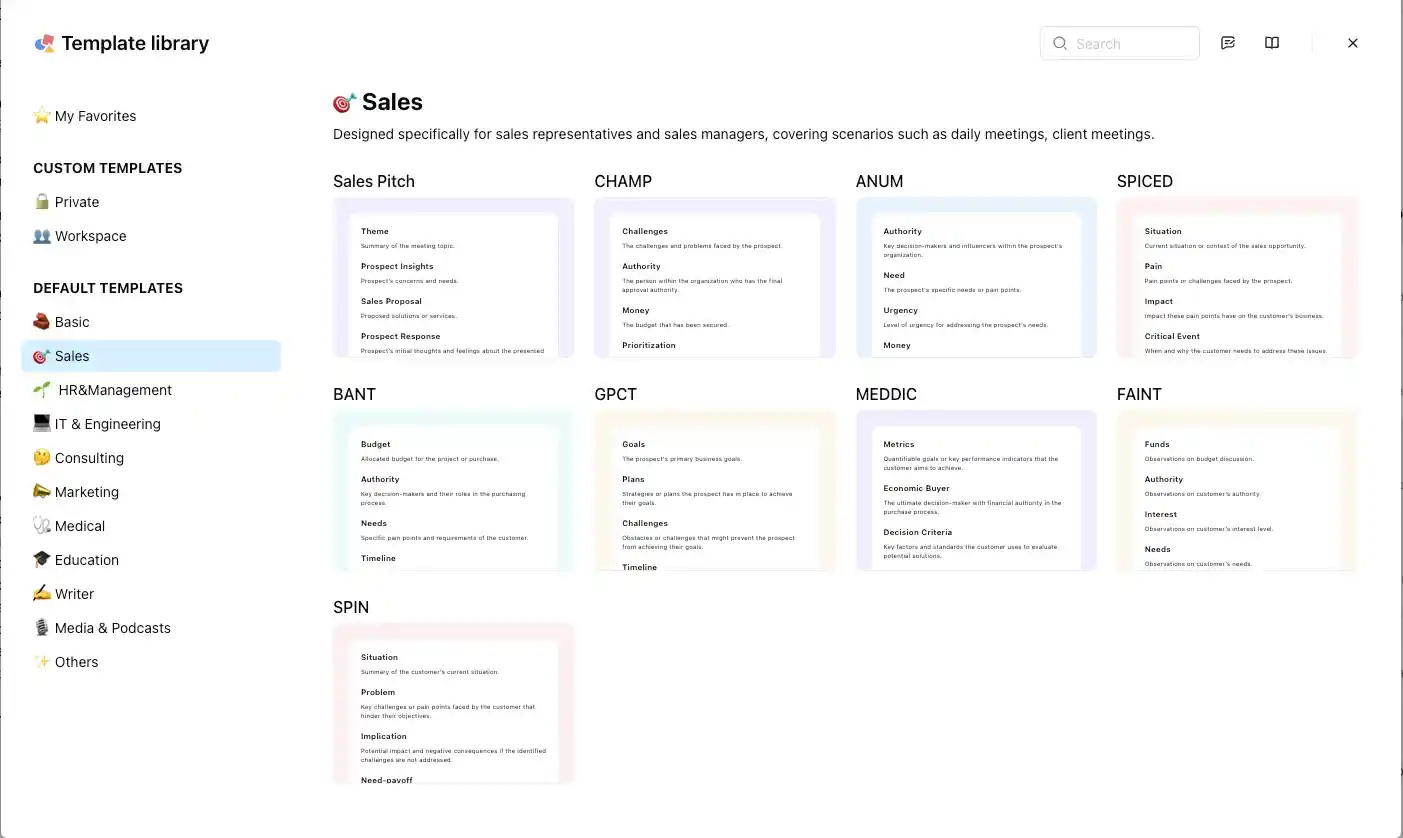
Common industry templates include:
- Sales: Focused on meeting summaries, deal tracking, and client communication
- Education: Designed for lectures, classroom notes, and learning documentation
- HR: Used for interviews, onboarding, and internal communication records
- IT: Suitable for technical meetings, project updates, and system discussions
Key highlights:
- More focused on structuring content by industry scenarios
- Templates are designed around different professional needs and real-world workflows
- Suitable for enterprise users and team collaboration
- Emphasizes standardized and consistent meeting documentation
Takeaway:
AI Video Summarizer's summary templates focus more on content reuse and repurposing, helping users quickly turn videos into blogs, notes, or social media content.
Notta, on the other hand, is more industry-focused, offering standardized templates designed for internal meeting notes and professional workflows within enterprises.
AI Video Summarizer vs Notta: Pricing Strategy
| Aspect | AI Video Summarizer | Notta |
|---|---|---|
| Pricing Model | ✅ 100% free | ⚠️Subscription-based |
| Starting Price | ✅ $0 | ⚠️~$13.49/month |
| Free Plan | ✅ All features free | ⚠️~200 minutes/month limit |
| Usage Limits | ✅ No limits | ⚠️Limited by plan level |
| Storage | Stored for 48 hours only | Cloud storage with plan limits |
| Export Formats | ✅ Multiple export formats | ⚠️Requires paid plan for full export access |
| Team Collaboration | ⚠️Not a core feature | ✅ Built-in collaboration tools |
AI Video Summarizer: Zero-cost, Barrier-free Experience
AI Video Summarizer adopts a fully free model, allowing users to access all core features without any subscription, and with no usage restrictions.
Its advantages are clear:
- Completely free to use, including all advanced features
- No limits on number of uses
- Flexible download and export options with no restrictions
- No time limits on uploaded videos and audio recordings.
Notta: Subscription-based Model
Notta uses a subscription system with multiple plans, including Free, Pro, Team, and Enterprise tiers, where features and usage limits increase with each upgrade.
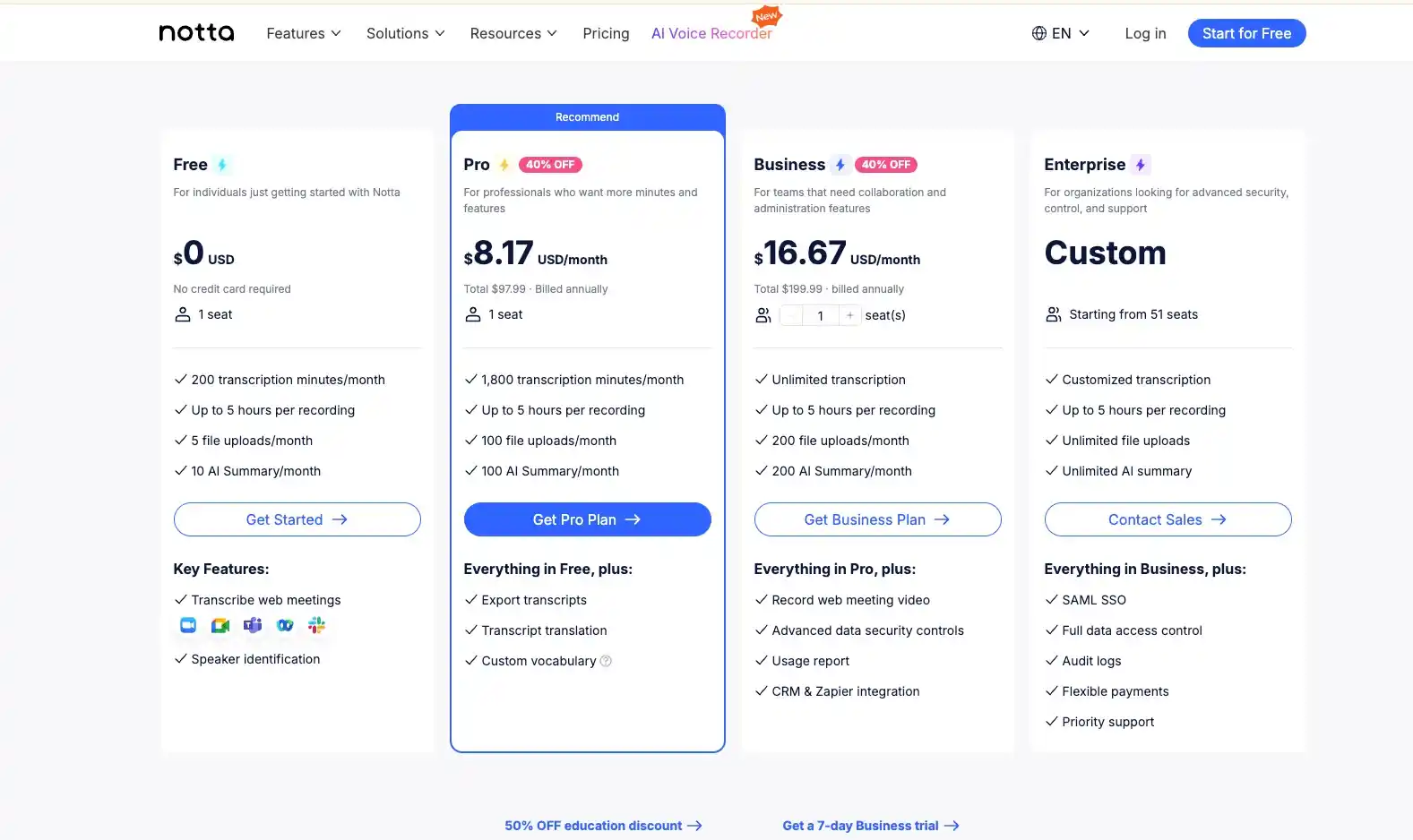
Compared with AI Video Summarizer, it is more suitable for collaborative users, such as:
- Users who frequently rely on Zoom or Google Meet and other meeting tools
- Teams that need regular meeting recording
- Business users who need to collaboratively manage meeting notes
Takeaway:
For individual users who want fast and low-cost content processing, AI Video Summarizer is clearly an ideal choice.
Notta is better suited for teams and enterprise users, offering a subscription model that unlocks a complete workflow for meeting transcription and collaboration, making it more suitable for long-term work scenarios.
AI Video Summarizer vs Notta: Best Use Cases
When to choose AI Video Summarizer:
AI Video Summarizer is better suited for users whose core need is content understanding and repurposing, focusing on quickly turning existing content into usable information.
- Those who want to get started quickly without registration and at no cost
- People with transcription and summarization needs across videos, audio files, PDFs, images, and other media formats
- Content creators looking to turn videos into blogs, social media posts, and other content formats
- Anyone who regularly works with long-form content such as tutorials, interviews, and podcasts, and prefers no time limits on uploads or processing
When to choose Notta:
Notta is better suited for use cases centered on meeting notes and collaboration, with a focus on real-time recording and team management.
- Users who frequently participate in online meetings or team discussions
- Teams that use Zoom, Google Meet, and other meeting platforms
- Users who need real-time transcription for meetings, interviews, or phone calls
- Teams that need to share, manage, and store meeting records long term
Final Verdict
AI Video Summarizer and Notta can both help users extract key information from content, but they are built for different purposes.
If your goal is to process different types of content and quickly turn them into notes, blogs, or other reusable formats, AI Video Summarizer is the more flexible option. If your work centers around meetings, real-time transcription, and team collaboration, Notta offers a workflow that better fits those needs.
For most individual users, AI Video Summarizer is easier to start with and provides a more cost-effective experience. Notta, meanwhile, is better suited for organizations with established meeting workflows and ongoing collaboration needs.