
AI Video Summarizer vs TurboScribe: From Transcript to Insights
Getting a transcript is not the same as truly understanding content.
When dealing with long videos or podcasts, what most people actually need is not a thousands-word verbatim transcript, but a way to quickly identify key points, evaluate value, and decide which parts are worth watching in more depth. However, many tools still treat generating a transcript as the final goal, leaving the work of organizing, extracting, and interpreting information to the user.
This is exactly where the core difference between AI Video Summarizer and TurboScribe becomes clear. AI Video Summarizer is more focused on delivering directly readable, structured summaries and template-based outputs, while TurboScribe is more focused on producing full transcripts and relying on external tools for further processing.
So when the goal shifts from simply obtaining a transcript to quickly accessing meaningful information, which tool delivers a better experience? This article will compare them in detail across multiple dimensions, including user experience, content usability, and real-world use cases.
Extract Key Insights from Video Now
Quick Overview of AI Video Summarizer and TurboScribe
| Aspect | AI Video Summarizer | TurboScribe |
|---|---|---|
| Access | ✅ No login, instant use | ⚠️ Requires account login |
| Pricing | ✅ Completely free | ⚠️ Freemium |
| Storage | Temporary storage (~48 hours) | Long-term storage with file organization |
| Core output | ✅ Transcript + subtitles + summary | ⚠️ Transcript only |
| Processing approach | ✅ Built-in summarization and structured processing | ⚠️ Transcript-first, relies on external tools |
| Structuring tools | ✅ 30+ summary templates + mind maps | ⚠️ No built-in summarization system |
| Multilingual support | ✅ 120+ languages one-click translation | ✅ Google Translate integration |
| Export formats | ⚠️ TXT / Word / PDF / SRT | ✅ TXT / Word / PDF / SRT / VTT / CSV |
| Export control | ⚠️ Basic settings | ✅ Advanced segmentation control |
| Workflow style | Instant understanding and content reuse | Post-processing workflow |
| Best suited for | Quick content understanding and lightweight use | Long-term transcription and file management |
What Is AI Video Summarizer?
AI Video Summarizer is a free online AI video summarization and content understanding tool. Its core goal is not to generate a verbatim transcript, but to directly transform video or audio content into structured, easy-to-read information. Compared to traditional transcription tools, it places greater emphasis on understanding and extracting meaning rather than simply recording.
In real usage, AI Video Summarizer feels more like an "information filter" than a transcription tool.
Users usually don't stay in a long block of raw transcript text. Instead, they directly choose a summary template such as Smart Notes, Key Insights, Competitor Analysis, and more. The system then automatically organizes the video content into the selected structure, turning it into something more consumable, rather than a long, unprocessed text that still requires additional work to make sense of.
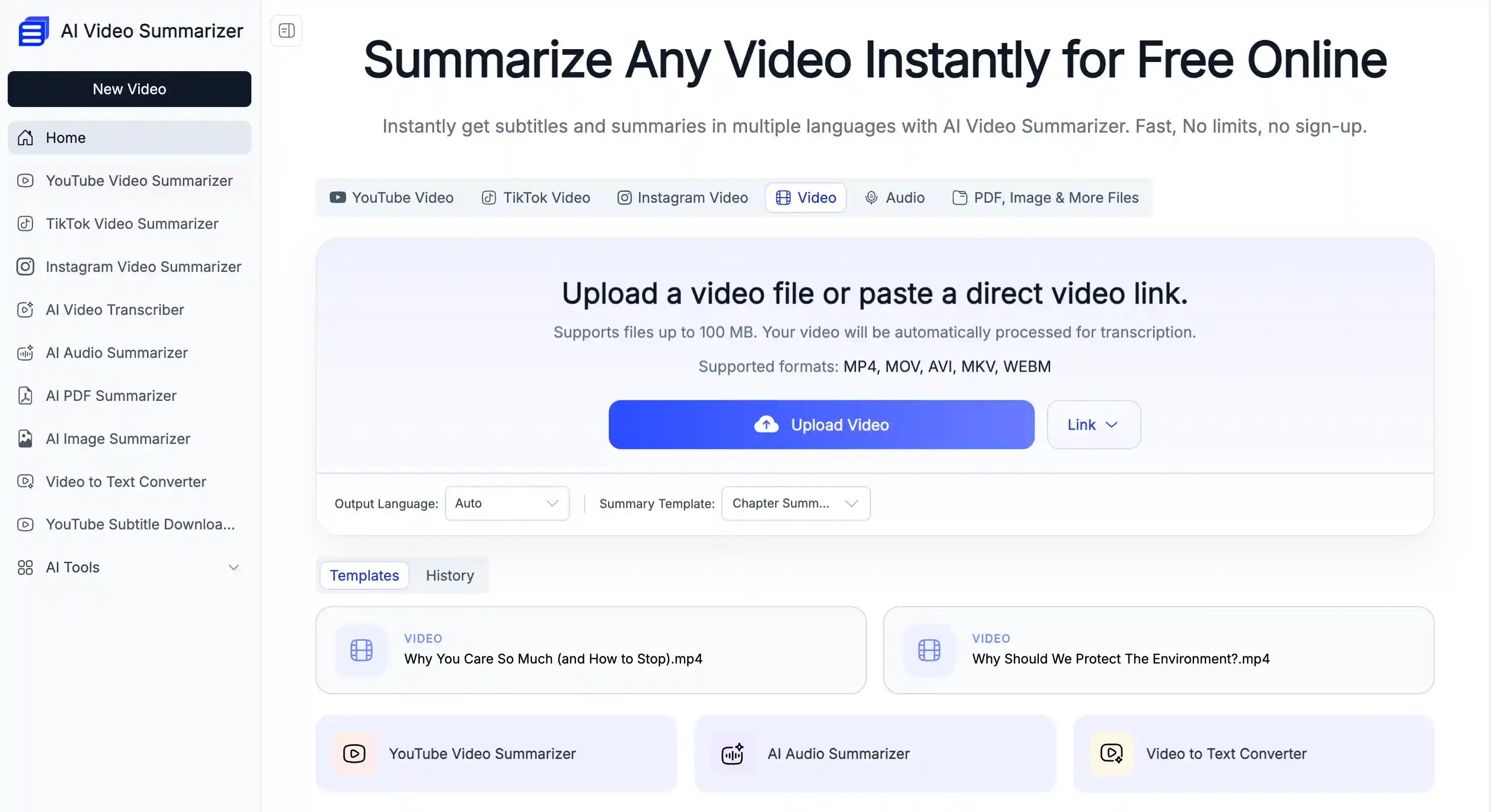
Key Features:
- 100% free to use, no usage limits: No subscription or payment is required to access core features, making it suitable for frequent daily use.
- 30+ summary templates available: Offers multiple formats such as key takeaways, structured notes, and content overviews, allowing users to switch based on different scenarios.
- Customizable summarization: Users can adjust the summarization style to better fit their personal workflow and specific needs.
- Built-in AI Chat feature: Lets users ask follow-up questions or explore details directly based on the video content for deeper understanding.
- Mind map generation: Automatically converts content into structured mind maps to help users quickly grasp the overall logic.
- Supports 120+ languages: Allows seamless switching between languages, making it suitable for multilingual content processing.
- One-click transcript and subtitles generation: Generates full transcripts and subtitle files at the same time for easy reuse and editing.
What Is TurboScribe?
TurboScribe is an AI-powered online transcription tool whose core focus remains on converting speech from video or audio into text. Unlike tools that emphasize insight extraction and structured outputs, TurboScribe prioritizes completeness and stability in transcription: it accurately converts audio or video into editable text, which can then be further processed using external tools.
After generating a transcript, users can refine and structure the content with ChatGPT, or translate it into multiple languages using Google Translate, expanding its usability across different scenarios.
Overall, TurboScribe follows a traditional workflow of "generate full text first, then process it afterward," making it more suitable for users who need high-quality transcripts and are willing to organize and extract insights in the next step.
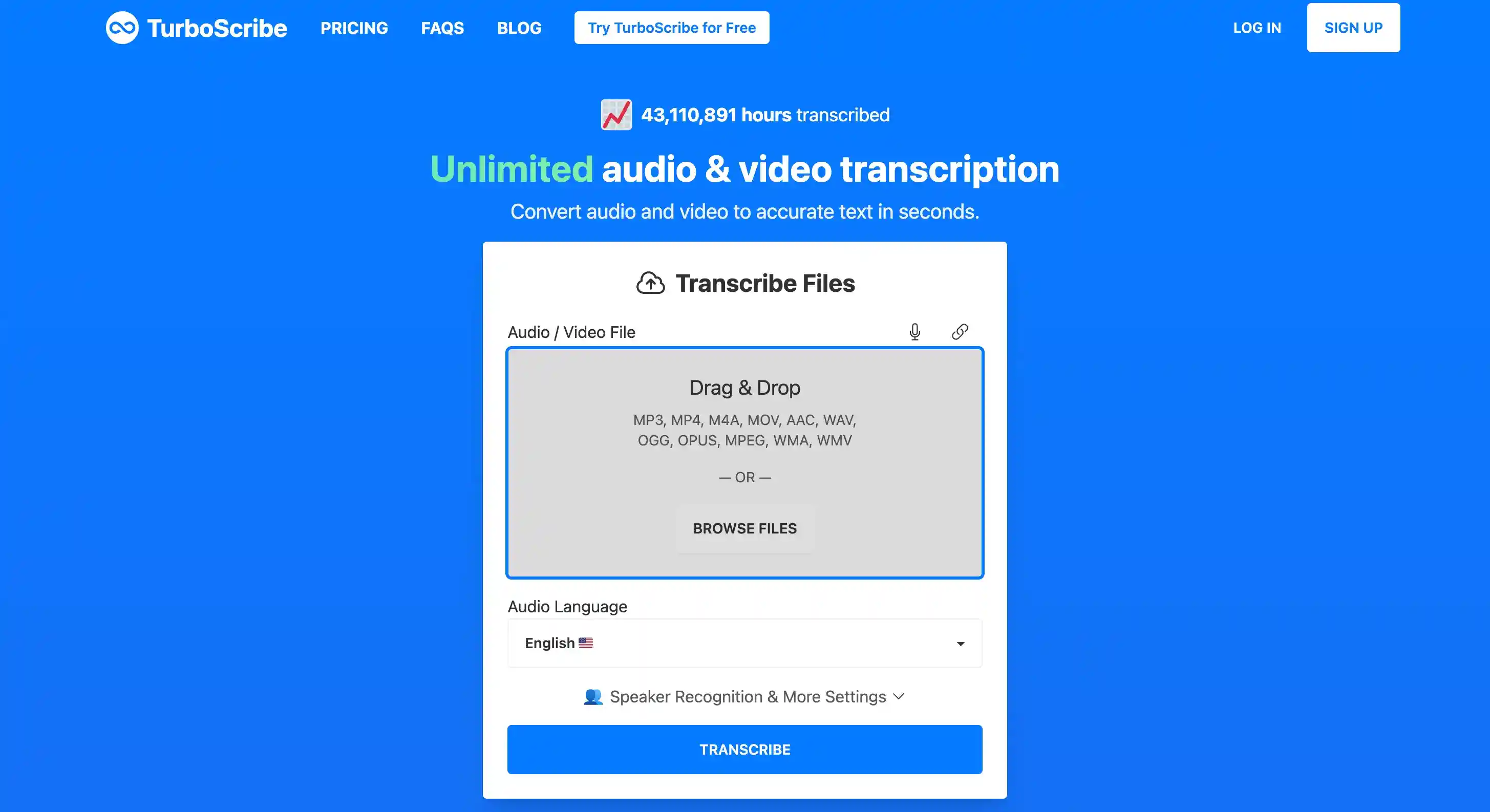
Key Features:
- File management with custom folders: Allows users to organize processed transcripts into folders for better project and content management.
- Built-in ChatGPT and Google Translate: Enables summarization, rewriting, and translation of transcripts directly within the platform without switching tools.
- Editable transcripts with multiple export options: Users can edit transcripts online, share them easily, and export in multiple formats with advanced output options.
Core Differences Between AI Video Summarizer and TurboScribe
AI Video Summarizer vs TurboScribe: User Experience and Workflow
| Aspect | AI Video Summarizer | TurboScribe |
|---|---|---|
| Entry barrier | ✅ No signup, instant access | ⚠️ Requires login |
| First-step experience | Light, direct, frictionless | Structured, more formal |
| Response speed | ✅ Faster, near-instant | ⚠️ Slower, depends on processing |
| Usage flow | Quick, one-off use | Task-based workflow |
AI Video Summarizer: Instant Start Experience
The biggest advantage of AI Video Summarizer is that it is ready to use immediately. Users do not need to log in or create an account, and can start using the tool as soon as they open the page. This makes the entire onboarding process feel almost frictionless.
In real usage, the time between uploading content and seeing results is also relatively short, creating a more instant feedback experience. For users who simply want to quickly extract key information, this low-latency flow feels much closer to getting the main insights right away.
TurboScribe: More Structured, Workflow-Oriented Startup Experience
TurboScribe follows a more structured, workflow-oriented approach to getting started. Users typically need to complete an account login before accessing the full experience, which becomes the first step of the overall journey and sets a more defined entry point.
In actual use, the process starts with uploading content and submitting a task, after which the system generates a full transcript. Since the output is designed as a complete verbatim record, the waiting time can vary depending on the length of the audio or video, and the overall experience feels more like a process-first, result-later workflow.
Takeaway
From the first-step experience perspective, the key difference between the two tools lies in onboarding friction and response speed.
AI Video Summarizer is more instant in nature. Users can access it directly and get results quickly, making the overall experience lighter and faster. It is better suited for users who simply want to extract key information without extra steps.
TurboScribe, on the other hand, follows a more standardized workflow. It requires users to log in before starting, and then proceed through upload and processing steps. The overall pace is more structured but involves a higher initial setup cost and longer waiting time, making it more suitable for users who prefer a complete transcription workflow.
AI Video Summarizer vs TurboScribe: Transcript Usability
| Aspect | AI Video Summarizer | TurboScribe |
|---|---|---|
| Output | ✅ Transcript & subtitles | ⚠️ Transcript only |
| Content processing | ✅ Built-in summarization and analysis tools | ⚠️ External tools for processing |
| AI features | ✅ Built-in AI Chat | ✅ ChatGPT integration |
| Structuring | ✅ 30+ summary templates + mind maps | ⚠️ Basic text structure |
| Multilingual support | ✅ 120+ languages translation | ✅ Google Translate integration |
| Overall experience | Integrated content understanding workflow | Basic transcription + external processing |
AI Video Summarizer: More focused on ready-to-use output
AI Video Summarizer can generate both transcripts and timestamped subtitles at the same time. This allows users to immediately use the results without any additional conversion.
In terms of extended content processing capabilities, it offers multiple summary templates covering different use cases such as structured notes, key point extraction, or content analysis. Users can quickly choose the right output format based on the content type.
Overall, the experience feels closer to a complete information processing workflow rather than a simple transcription tool.
Core Processing Capabilities
- Generates both transcripts and timestamped subtitles simultaneously
- Provides 30+ structured summary templates for different content types and use cases
- Built-in AI Chat for asking questions and understanding content in context
- One-click mind map generation for quick content structuring
- Supports 120+ languages with one-click translation for cross-language use and sharing
TurboScribe: A workflow-oriented transcription tool
TurboScribe's core output is still centered on transcripts. It does not currently provide built-in subtitle generation, so in video subtitle or visual content use cases, additional processing is usually required.
For follow-up usage, it relies more on external tools such as ChatGPT and Google Translate to extend and process the content.
The overall workflow is more focused on generating a complete transcript first, then allowing users or external tools to perform secondary structuring and refinement. The tool itself does not handle much of the content understanding or post-processing layer.
Core Processing Capabilities
- Focuses on generating high-accuracy, full transcripts as the core output
- Provides basic text editing and manual revision features
- Built-in ChatGPT for summarizing and asking questions about transcript content
- Integrated Google Translate for multilingual content conversion
Takeaway
The two tools follow clearly different approaches in their core processing design.
AI Video Summarizer focuses on an integrated experience from content generation to understanding, allowing users to move directly into structuring and analysis right after transcription, with fewer extra steps required. TurboScribe is more focused on producing stable, high-quality full transcripts, while relying on external tools for summarization, translation, and deeper content processing, making it better suited as a foundational transcription layer.
The former is better for users who want fast information access and immediate content usability, while the latter fits workflows that depend on transcripts as raw material for further processing.
AI Video Summarizer vs TurboScribe: Storage and Export
| Aspect | AI Video Summarizer | TurboScribe |
|---|---|---|
| Storage type | No account, temporary storage | Account-based, long-term storage |
| File retention | Deleted after about 48 hours | Saved for long-term access |
| File management | No folder system | Folder organization supported |
| Export formats | TXT / Word / PDF / SRT | TXT / Word / PDF / SRT / VTT / CSV |
| Timestamp support | Optional | Optional |
| Export control | Basic options | Advanced split control (time and length) |
AI Video Summarizer: Lightweight, Temporary Storage
AI Video Summarizer does not rely on an account system, so user files are not stored long-term. In most cases, processed results are kept for around 48 hours before being automatically deleted. This design keeps the tool lightweight and more privacy-friendly, but it also means users need to download or save their results within a short time window.
In terms of export, it supports common formats including TXT, Word, PDF, and SRT, with the option to include or exclude timestamps. This makes it suitable for different use cases such as reading, note-taking, or subtitle generation.
TurboScribe: Long-Term File Management System
TurboScribe is built around an account-based system that enables more persistent storage. Users can keep their transcription history over time and organize files into folders, making it more suitable for multi-project workflows or ongoing use cases.
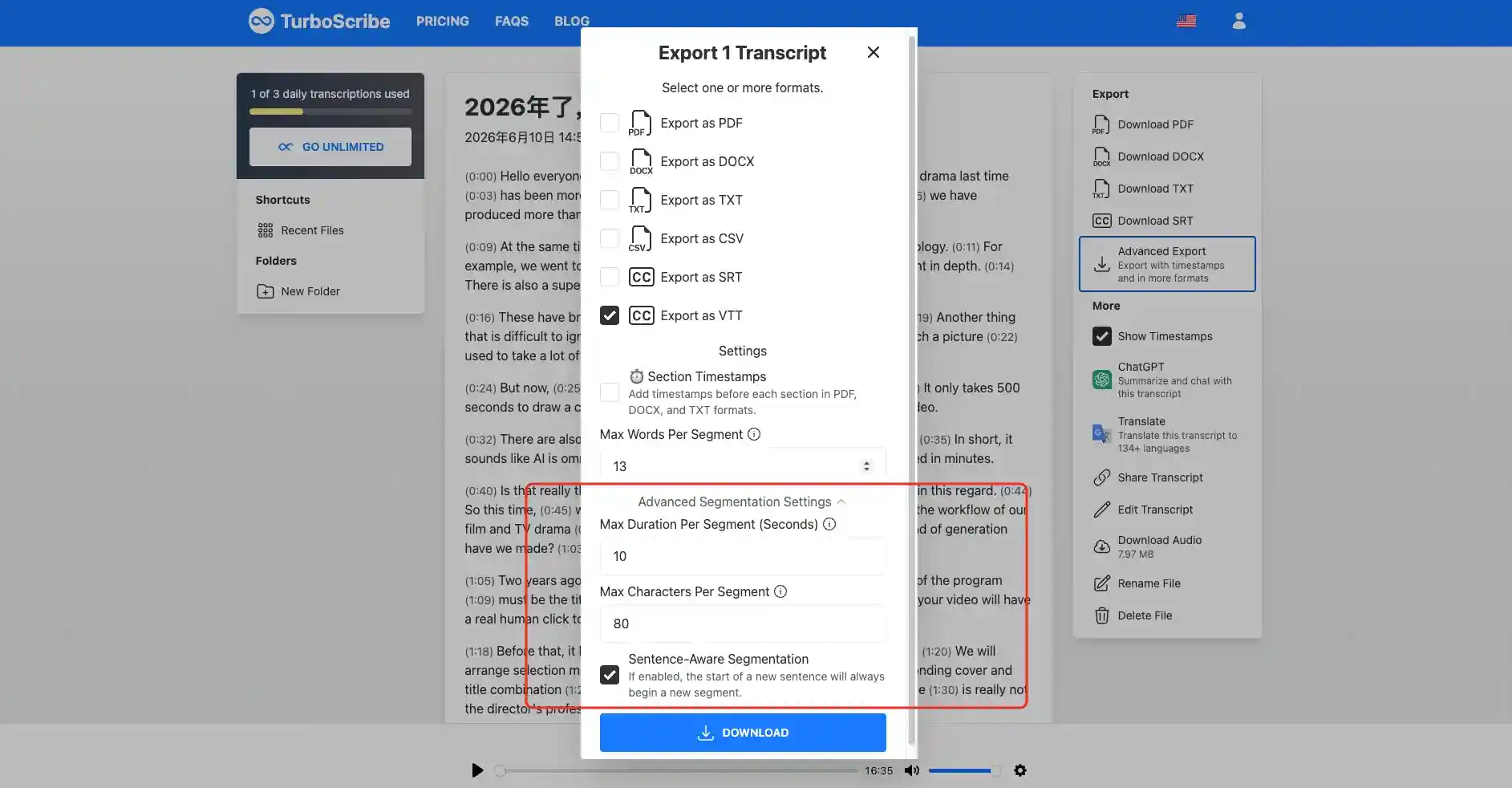
In terms of export, it supports standard formats such as TXT, Word, PDF, and SRT, with additional support for VTT and CSV. It also provides more granular export controls, such as setting a maximum character length per segment, allowing users to adjust how transcripts are split and structured for different downstream needs.
Takeaway
AI Video Summarizer focuses on short-term storage and instant use, emphasizing a lightweight and fast experience.
TurboScribe is better suited for long-term file management and flexible export options, making it more appropriate for users who need structured organization and repeated use of transcription content.
AI Video Summarizer vs TurboScribe: Pricing
| Aspect | AI Video Summarizer | TurboScribe |
|---|---|---|
| Cost | ✅ Completely free | ⚠️ Freemium |
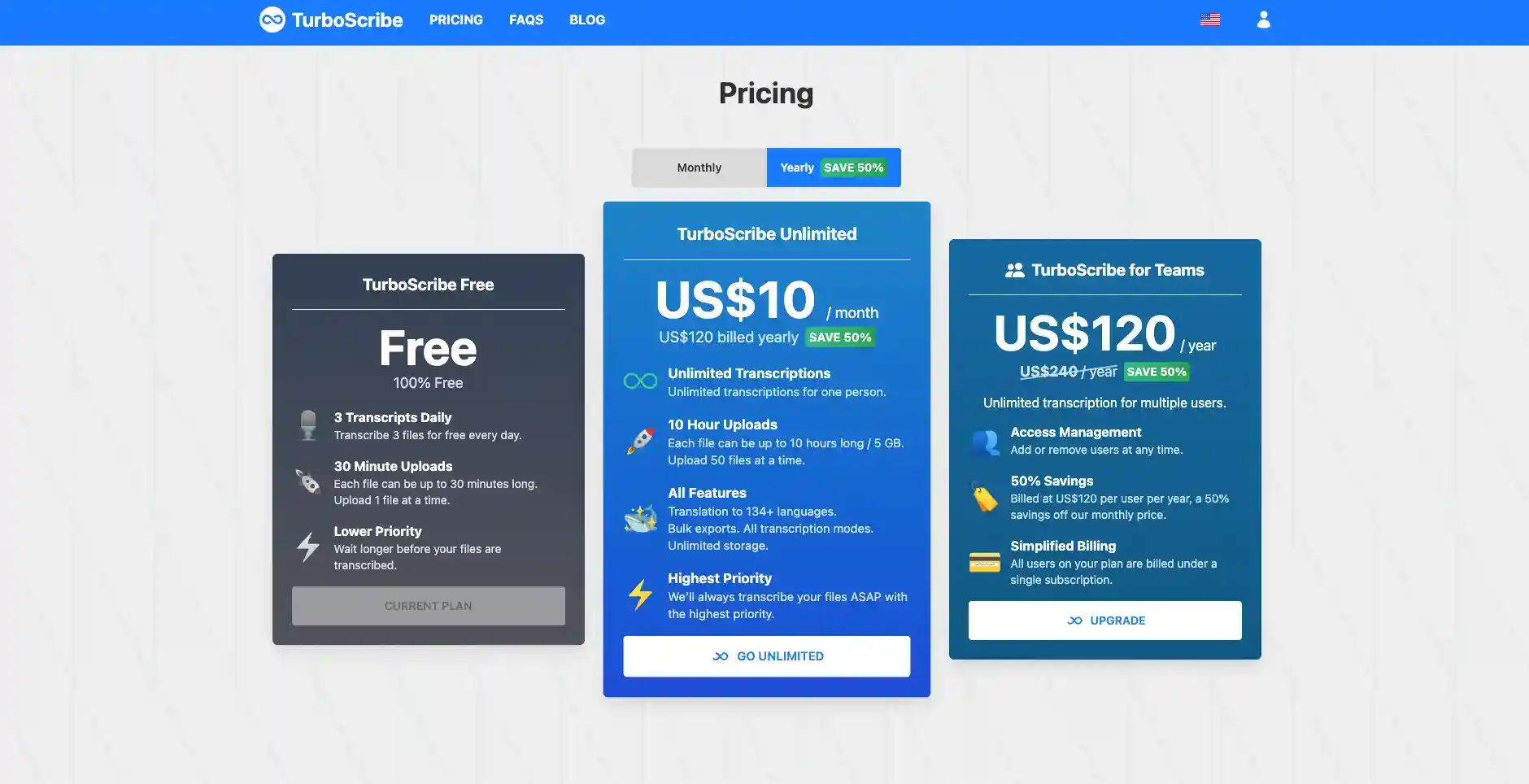
| Free usage | ✅ Unlimited | ⚠️ 3 files per day |
| File length limit | ✅ Unlimited | ⚠️ Up to 30 minutes per file |
| Usage limits | ✅ Unlimited | ⚠️ Limited on free plan |
| Processing priority | Standard speed | Lower priority on free / higher priority on paid |
| Team plan | Not available | $120/user/year |
AI Video Summarizer: Completely Free to Use
AI Video Summarizer offers a fully free experience. Users can upload video or audio files directly for processing, with no limits on file duration. This model is better suited for lightweight and everyday use cases, where users do not need to worry about usage limits or content length, and can freely generate multiple summaries as needed.
Pricing Advantages
- Completely free to use: No subscription or payment required, with full access to core features
- Unlimited usage: No daily or monthly limits on how often you can use the tool
- No duration limits: Supports long video and audio files without restrictions
- Ideal for lightweight users: Suitable for students, creators, or anyone who occasionally needs quick content summaries
TurboScribe: Tiered Subscription Model
TurboScribe uses a tiered subscription model that includes a free tier and paid upgrade options, covering needs from light usage to high-volume professional use. The overall structure combines a free entry option with unlimited premium usage, allowing users to choose a plan based on their usage frequency.
Suitable User Types
- Batch processing users: Need to handle multiple files or large volumes of audio and video content at once
- Team or business users: Require collaboration and centralized management of transcription content
- Heavy workflow users: Use transcription as part of their daily workflow and need stable, continuous usage
Takeaway
From a positioning perspective, the two tools serve different needs: one focuses on fast information extraction with zero cost, while the other is more oriented toward transcription and file management within a structured workflow.
If you prefer a lightweight and instant experience, the fully free AI Video Summarizer with no usage limits is a better fit. If you need long-term audio and video processing or a system for organizing and managing transcription files, TurboScribe is a stronger option, especially for team or heavy-use scenarios.
AI Video Summarizer vs TurboScribe: Best Use Cases
In actual use, the main difference between the two tools is not whether they generate transcripts, but how the transcript is used afterward and how the overall workflow is designed.
AI Video Summarizer is better suited for
- Users who want to quickly understand key points of a video instead of reading the full transcript
- People who prefer instant access without registration or login
- Light users who value a completely free tool with no usage limits
- Users who prefer structured outputs rather than just raw transcripts
TurboScribe is better suited for
- Those who prefer account-based systems and structured file management
- Long-term storage and organized management of transcription files
- Power users or teams with batch processing needs or high-frequency workflows
Final Verdict
The choice between AI Video Summarizer and TurboScribe ultimately depends on how you want to use transcripts.
If your goal is to quickly extract key points from videos or audio with a simple and direct workflow, AI Video Summarizer is the better fit. It requires no registration or login and can be used instantly, making it ideal for everyday content processing.
More importantly, it goes beyond transcription by directly generating structured summaries, key points, and mind maps, while also supporting multilingual translation. This makes the content immediately usable instead of just raw text.
In contrast, TurboScribe is more focused on full transcription and downstream organization, making it better suited for users who need to store and manage large amounts of text over time.
However, for most everyday users, the real need is not managing transcripts, but quickly understanding content. In this sense, AI Video Summarizer's lightweight design and integrated workflow better match real-world usage.