
AI Video Summarizer vs YouTube to Transcript: Which Is the Best YouTube Transcript Tool in 2026?
Why You Need a YouTube Transcript Tool
If you are engaged in research, or if you are a student or a content creator, you need to get inspiration through YouTube videos. So, you will definitely encounter this problem: repeatedly watching videos to extract information is both time-consuming and difficult.
If you want to learn a 90 minutes podcast and accurately quote expert opinions in your own article, you will constantly watch back and forth on the video timeline to capture each viewpoint, which is very inefficient. In this situation, a reliable YouTube transcription tool becomes crucial.
To solve this problem, I found the two most popular YouTube transcription tools: AI Video Summarizer and YouTube to Transcript. They are all free, fast, and promise to provide accurate transcription services, but there are differences in key aspects.
In this article, I will compare these two tools and help you choose the most suitable YouTube transcript tool to solve the problems you encounter.
What Is a YouTube Transcript Generator?
YouTube transcript generator is an online tool that converts YouTube video content into text that you can read. Most tools only capture subtitles that YouTube has already created, while a small portion of tools transcribe audio from YouTube videos, which is the only way to obtain any video content without subtitles.
Its working principle is extremely simple: just enter a URL, wait for the tool to process the audio or subtitles and output the transcribed content. Its greatest value is not only in saving time, but also in having the following functions:
- When taking notes while watching videos, there is no need to pause or type frequently. Simply transcribe with one click.
- Convert the video back into a blog post and social media content.
- Learn multiple languages and easily access YouTube videos of any language you are currently learning with just one click.
AI Video Summarizer vs. YouTube to Transcript
After experiencing the AI Video Summarizer and YouTube to Transcript tools in real life, we have compiled their respective advantages and disadvantages. Through this overview table, you can quickly determine which tool is most suitable for your needs.
| Feature | AI Video Summarizer | YouTube to Transcript |
|---|---|---|
| Pricing | ✅ Free, no sign-up | ✅ Free, no sign-up |
| Video length | ✅ Up to 2-hour videos | ✅ Up to 2-hour videos |
| Accuracy | ✅ Up to 99.8%, works without captions | ❌ Based on YouTube's captions/subtitles |
| Languages | ✅ 150+ languages | ✅ 125+ translation languages |
| Timestamps | ✅ Yes, click any line to jump | ✅ Yes, click any line to jump |
| Speaker | ✅ Yes | ❌ No |
| Translation | ✅ Yes (transcription in original + output language) | ✅ Yes, 125+ languages |
| AI Summarizer | ✅ Transcript summarization | ❌ No |
| Download / Export | ✅ Yes (subtitles, chapters, transcripts) | ❌ Copy only (no download yet) |
Overall, if the YouTube video you need to transcribe does not have subtitles, then you should choose YouTube to Transcript. If you plan to generate timestamps, chapters, and speaker labels for long videos, then the AI Video Summarizer performs better and is the best choice.
AI Video Summarizer – YouTube Transcript Generator Review
Core Features
The transcription generator of AI Video Summarizer generator is designed for heavy workloads. Just paste a YouTube link or put it into the entire playlist, or YouTube short video, without any other restrictions. After uploading the YouTube video, select the output language, turn on the speaker, and then click the button to start transcribing.
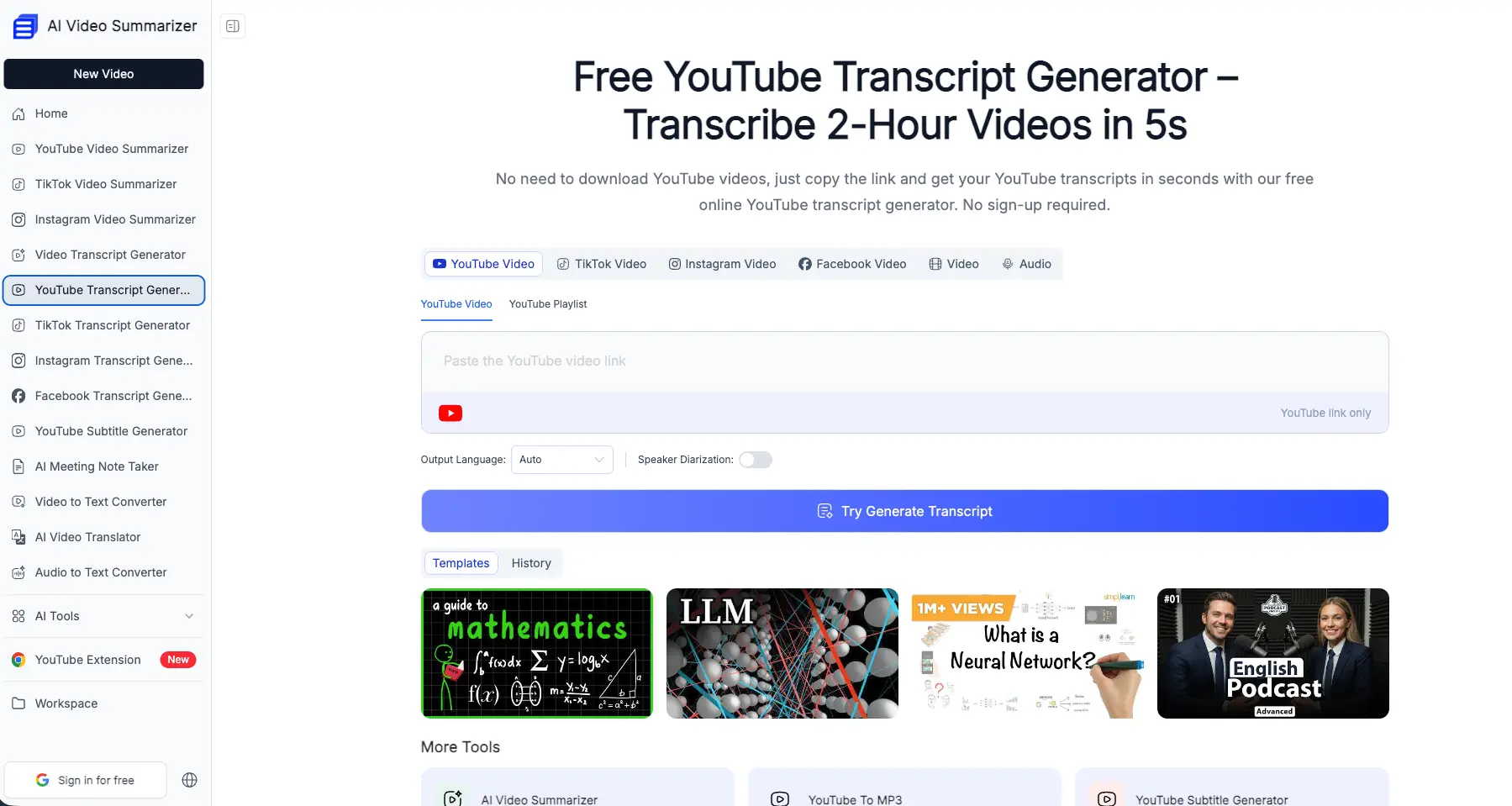
Here's what sets it apart from other free youtube to transcript tools:
- Playlist Support - Transcribe an entire series of content at once.
- Speaker Identification - Label content by speaker--essential for interviews and panel discussions.
- Export Options - Download subtitles, chapter markers, or the full transcript with timestamps.
- Built-in Summarization - Generate a summary of the transcript without leaving the page.
- Built-in AI Chat - Ask the AI questions based on the generated content to clarify any points of confusion.
- Built-in AI Mind Mapping - Instantly convert the summary into an easy-to-understand mind map.
Transcription Accuracy – 99.8%, Even Without Captions
Accuracy is the biggest difference between AI Video Summarizer and YouTube to Transcript, as one recognizes speech content transcription and the other recognizes subtitle transcription. In our real life, many YouTube videos do not have subtitles at all.
The AI Video Summarizer directly transcribes audio from videos, so even without the original subtitles, you can still obtain readable YouTube video transcripts with an accuracy rate of up to 99.8%. For researchers and journalists who require accurate citation, this is undoubtedly the best tool.
Speed & Video Length – 2-Hour Video in 5 Seconds
Long videos are where most free tools give out. Some cap you at 10 or 20 minutes; others leave you queuing for minutes on end. AI Video Summarizer handles 1-2 hour interviews and TED talks without breaking stride, turning out the full transcript in about 5 seconds. No downloads, no waiting -- just the link.
Timestamps, Chapters & Searchable Output
Every transcript comes with timestamps generated automatically, so you can jump straight to the moment a keyword shows up. The tool also builds out chapters, which turns a two-hour video into something structured and skimmable. Need to quote a specific section or check what was said at minute 47? Click and you're there.
150+ Languages & Dialects
After practical use, it was found that the AI Video Sundarizer can recognize over 150 languages, making it a reliable tool for learning international content across multiple languages.
Pros
- High accuracy even without captions (up to 99.8%)
- Handles very long videos without slowing down
- Timestamps, chapters, and speaker diarization included
- Playlist support, free with no sign-up needed
Cons
- No way to remove specific sections from the transcript
- Translation options are convenient, but they cannot fully cover over 200+languages.
YouTube to Transcript – YouTube Transcript Generator Review
Key Features
YouTube to Transcript is an online branding tool that means turning YouTube into a transcript. Just paste a link and click 'Get Transcript' to retrieve the transcribed text. If you don't understand a certain part of the video, you can click on any line to redirect the video directly to that moment.
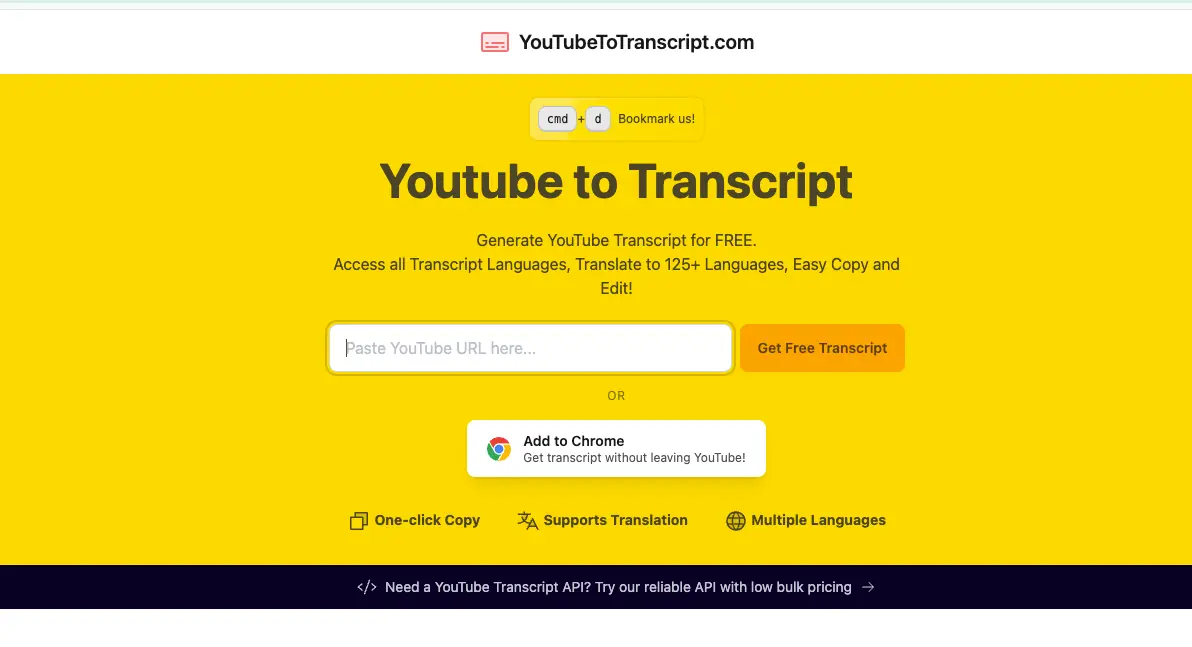
A few more features worth noting:
- One-click copy - grab the whole transcript in a single click.
- Embedded player - read and watch at the same time.
- Remove Unwanted Sections - cut out intros, outros, or sponsored segments before copying.
- Free AI Prompt Library - a curated set of prompts for turning any transcript into summaries, notes, quizzes, or creative content.
- Change language + Translation - switch to any available transcript language, or translate the result into 125+ languages.
Remove Unwanted Sections
This is a feature you rarely see in free tools. Creators often pack 30-60 seconds of intro, outro, or sponsor reads into every video. YouTube to Transcript lets you highlight and cut those sections out, so your final transcript for youtube videos stays clean and focused -- no need to strip the filler in a separate editor afterward.
Translation to 125+ Languages
If your audience is international, translation depth matters. YouTube to Transcript translates any transcript into over 125 languages with a single click. Paired with the embedded player, it's a solid tool for non-native speakers who want to read along in their own language while watching the original video.
Free AI Prompt Library
Instead of just exporting text, YouTube to Transcript comes with a library of ready-made prompts you can run on the transcript -- generate summaries, pull out key points, build quizzes, grab quotes, or brainstorm memes and infographics. It's a lightweight content-repurposing workflow, all on one page.
No Limits, But No Download Option
There's no limit on video length and no cap on how many transcripts you can generate. The main gap: no direct download option yet. You can copy the transcript with one click and paste it anywhere, but if you need an actual file export, you'll be doing that manually for now. The team says download support is on the way.
Pros
- Split-view player with click-to-jump navigation
- Remove unwanted sections (intros, outros, sponsors)
- 125+ language translation
- Free AI prompt library
- No limits on video length or usage
Cons
- Transcript quality depends on YouTube's captions
- No download/export option yet
- No speaker recognition
Which Tool Transcribes YouTube Videos Better?
Transcription Accuracy
When captions are clean, both tools hold up fine. The gap shows up when captions are missing, or when auto-generated ones are garbled. AI Video Summarizer transcribes directly from the audio, with accuracy claimed up to 99.8%, the safer pick when you need quote-level precision. YouTube to Transcript pulls from existing captions, which is fast but inherits whatever mistakes are already baked in.
Best Choice: AI Video Summarizer
Timestamps, Speaker & Chapters
Both produce timestamped output and let you jump to specific moments. AI Video Summarizer adds auto-generated chapters and speaker labels, a clear win for long, multi-speaker content. YouTube to Transcript's click-any-line navigation inside the embedded player is arguably smoother for reading along while watching.
Best Choice: AI Video Summarizer
Ease of Use & Interface
Both tools are genuinely simple: paste, click, copy -- no extra steps. YouTube to Transcript's split view makes for a pleasant reading experience; AI Video Summarizer's single-purpose generator is more minimal. Neither requires an account. This one really comes down to preference, with a slight edge to YouTube to Transcript for its layout.
Best Choice: YouTube to Transcript
AI Summarization & MindMap
AI Video Summarizer integrates features such as content summarization, chapter segmentation, and the export of both summaries and full transcripts, whereas "YouTube to Transcript" lacks these capabilities. Processing the transcribed content is also a key function of such YouTube transcription tools.
Best Choice: AI Video Summarizer
Final Summary - The Best YouTube to Transcript Tool in 2026
Both of these tools are free to use and can be quickly generated. But their principles of transcribing videos are different. If you often deal with videos that lack subtitles, require high accuracy, and handle videos that are long, then AI Video Summarizer is a better choice, which supports exporting as transcripts, subtitles, chapters, or even entire playlists. If you are more concerned about the reading experience and need to remove the introduction and sponsored clips, and do not require high accuracy in transcription, then YouTube to Transcript will be more suitable for you.
Overall, if there are no subtitles or high accuracy requirements, priority should be given to using an AI video summarization generator. For flexible and translatable text, please use YouTube to Transcript. As both continue to develop, we will constantly update this comparison, as a good YouTube transcription tool should become better and better, rather than stagnant.
FAQ
Is it free to transcribe YouTube videos with these tools?
Yes. Both AI Video Summarizer and YouTube to Transcript are completely free, with no sign-up or credit card required. No hidden fees for standard youtube transcription.
Can I get a transcript for a YouTube video without captions?
Yes, with AI Video Summarizer. It transcribes directly from the video's audio and claims up to 99.8% accuracy, even when the video has no captions or only poor auto-generated ones.
How long can a YouTube video transcript be?
AI Video Summarizer handles 1- to 2-hour videos and produces a full transcript in about 5 seconds. YouTube to Transcript has no video length limit either -- multi-hour videos transcribe just fine.
Can I download a YouTube video transcript?
AI Video Summarizer lets you export the transcript, subtitles, and chapters. YouTube to Transcript currently offers one-click copying rather than a download option, though file export is planned.
Can I translate a YouTube transcript?
Yes. YouTube to Transcript translates transcripts into 150+ languages, while AI Video Summarizer supports transcription in 100+ languages and dialects with a selectable output language.